Showing posts with label money. Show all posts

Monday, June 3, 2024

Import Latest NAV of Mutual Funds from AMFIndia.com into Google Sheets

Mutual funds are a popular investment vehicle and staying updated with the latest Net Asset Values (NAVs) is crucial for investors to make informed decisions. One of the most efficient ways to track these values is by importing them directly into Google Sheets, which allows for real-time updates and easy analysis. In this blog post, I'll guide you through the process of importing the latest NAV of mutual funds from the Association of Mutual Funds in India (AMFIndia.com) and displaying them in Google Sheets to use the data for various calculations. 

Mutual Funds latest NAV report
One thing I want you to be aware of is that the real-time NAV of your chosen mutual fund is also available in Google Sheets using the GOOGLEFINANCE formula which I have explained in detail in the post How to get stock prices from Google Finance in Google Sheets. Here, the difference is that while the GOOGLEFINANCE formula returns the price of a specific fund, the method which I explain here imports the full list of available funds and their NAVs in your spreadsheet which you can play with later.

If you don't want to go through the hassle of going through this article, I have provided a link to a sample Google Sheets file which you can save for yourself and start using.

Why Use Google Sheets for Tracking NAVs?

Google Sheets offers several advantages for tracking mutual fund NAVs:

  1. Real-time Updates: Google Sheets can automatically update data, ensuring you always have the latest information.
  2. Accessibility: Being a cloud-based platform, you can access your data from anywhere.
  3. Ease of Use: Google Sheets' user-friendly interface and powerful functions make data manipulation and analysis straightforward.
  4. Collaboration: Multiple users can view and edit the sheet simultaneously, making it ideal for collaborative work.

Open-Ended and Close-Ended Mutual Funds

Before we get into the detailed steps of how to accomplish the task we have in hand, here a small description of "open-ended" and "close-ended" mutual funds in India. I will leave you with only definitions here as there are many resources online with more details of the same. The AMFIndia website provides data for both types of mutual funds.

Open-ended mutual funds do not have a fixed maturity period. They allow investors to enter (buy units) and exit (redeem units) at any time at the fund’s prevailing Net Asset Value (NAV).

Close-ended mutual funds have a fixed maturity period. Investors can buy units only during the initial offering period (New Fund Offer or NFO) and can redeem them only at maturity. These funds are listed on stock exchanges, where they can be traded like stocks.

Step-by-step Guide

Step 1: Accessing AMFIndia.com

Firstly, you need to understand where and how to access the mutual fund NAV data on the AMFIndia website. AMFIndia.com typically provides NAV data in a downloadable format directly from the web site

  1. Visit the AMFIndia Website (amfindia.com) using your favorite web browser and find the Download NAV link at the bottom of the page
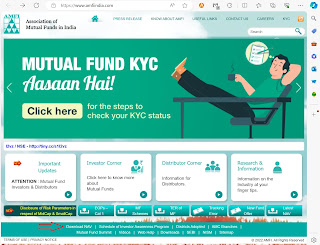
    AMFIndia Website homepage


  2. The NAV data for "open-ended" and "close-ended" mutual funds are available as separate links like indicated with red boxes in the screenshot below. The data inside the links are structured in the same format as a flat file with semi-colon separated values
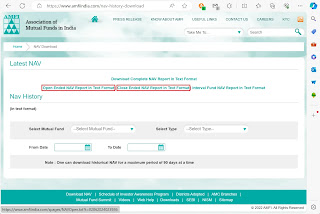
    Latest NAV links


  3. The link to open-ended mutual fund schemes typically looks like https://www.amfiindia.com/spages/NAVOpen.txt and a sample content is shown in the image below
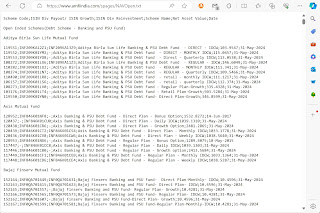
    Open-ended schemes data


  4. The link to close-ended mutual fund schemes typically looks like https://www.amfiindia.com/spages/NAVClose.txt and a sample content is shown in the image below
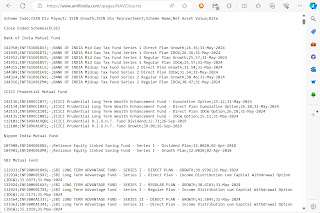
    Close-ended schemes data


  5. As of this writing, access to the AMFI data is available free of cost to all

Step 2: Importing the Data into Google Sheets

To automate fetching the latest NAV data, we will use Google Sheets’ IMPORTDATA formula which can be used to seamlessly import and parse properly structured .csv (comma-separated value) or .tsv (tab-separated value) data from a URL. Here in our case, the data is not comma separated and there are some additional complexities which we will address later. For now, our objective is to get the full data inserted into our spreadsheet. For the sake of simplicity, here I will demonstrate with only the open-ended mutual fund data. The close-ended data URL can be imported and parsed following the same guidelines.

  1. Go to Google Sheets and create a new spreadsheet
  2. In a cell, like B2, enter the URL for the open-ended schemes' data https://www.amfiindia.com/spages/NAVOpen.txt


  3. Next, in the cell from where you want the data import to begin, like A3, use the IMPORTDATA formula. This will import all content from the link into the spreadsheet


  4. Next you can parse and display the data into structured cells in the sheet

Step 3: Parsing the Data in Google Sheets
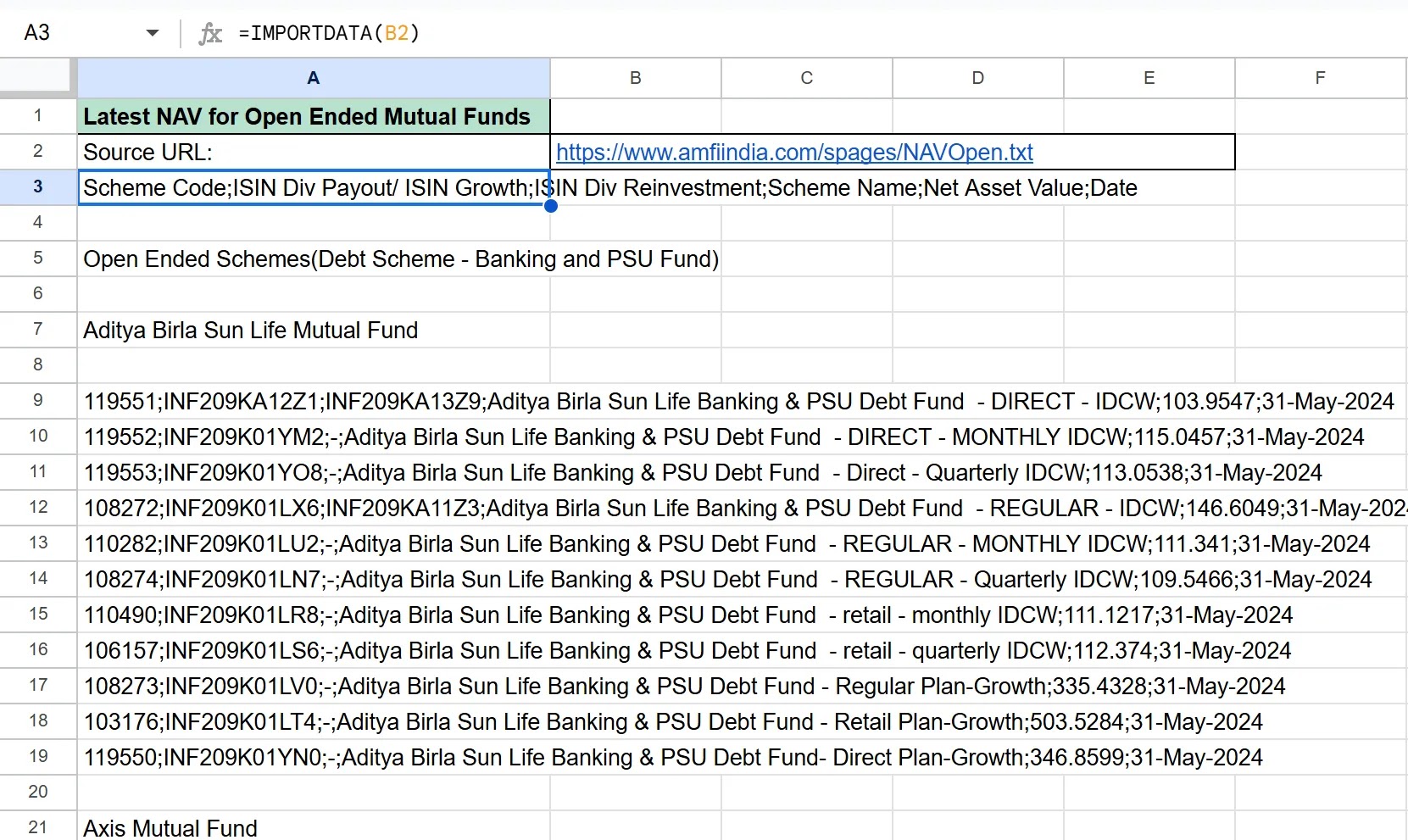
At this point, your spreadsheet should be filled with data which you imported in the previous step, but you will observe that the data is like a big blob of text which got downloaded and is of not much use unless you can parse and split it into specific columns. It gets a little bit tricky after this which is what we will get into here. Here is a screenshot of how your spreadsheet looks like right now - observe that there are some virtual headers and the bulk of the content is related to one mutual fund scheme per line, with the data values separated with semicolons.


On close observation of the first line, you will notice that it is a description of the columns for each line:

Scheme Code;ISIN Div Payout/ ISIN Growth;ISIN Div Reinvestment;Scheme Name;Net Asset Value;Date

We will use this description to do some simple calculations and parse the date into spreadsheet columns.

Now, look at cell A9 which contains the text: 119551;INF209KA12Z1;INF209KA13Z9;Aditya Birla Sun Life Banking & PSU Debt Fund - DIRECT - IDCW;103.9547;31-May-2024

Our objective is to parse and map this text to the header descriptions which we saw above, like this:

Scheme Code: 119551
ISIN Div Payout/ ISIN Growth: INF209KA12Z1
ISIN Div Reinvestment: INF209KA13Z9
Scheme Name: Aditya Birla Sun Life Banking & PSU Debt Fund - DIRECT - IDCW
Net Asset Value: 103.9547
Date: 31-May-2024

In cell C9 enter the following formula to extract the Scheme Code:

=IF(ISERROR(LEFT(CONCAT(A9,B9),SEARCH(";",CONCAT(A9,B9))-1)),"",LEFT(CONCAT(A9,B9),SEARCH(";",CONCAT(A9,B9))-1))


For our convenience, in cell D9, we will calculate and store the offset from where the search for the next field should start from. So, in cell D9 enter the following formula:

=IF(C9="","",LEN(C9)+1)


Use this same method cyclically to get the other field values into further cells.

In cell E9, use the following formula to extract the value for ISIN Div Payout/ ISIN Growth:

=IF(C9="",A9,MID(CONCAT(A9,B9),D9+1,SEARCH(";",CONCAT(A9,B9),D9+1)-D9-1))

In cell F9, again calculate and store the offset from where the search for the next field should start from:

=IF(C9="","",D9+LEN(E9)+1)

In cell G9, use the following formula to extract the value for ISIN Div Reinvestment:

=IF(C9="","",MID(CONCAT(A9,B9),F9+1,SEARCH(";",CONCAT(A9,B9),F9+1)-F9-1))

In cell H9, again calculate and store the offset from where the search for the next field should start from:

=IF(C9="","",F9+LEN(G9)+1)

In cell I9, use the following formula to extract the value for Scheme Name:

=IF(C9="","",MID(CONCAT(A9,B9),H9+1,SEARCH(";",CONCAT(A9,B9),H9+1)-H9-1))

In cell J9, calculate and store the offset from where the search for the next field should start from:

=IF(C9="","",H9+LEN(I9)+1)

In cell K9, use the following formula to extract the value for NAV:

=IF(C9="","",MID(CONCAT(A9,B9),J9+1,SEARCH(";",CONCAT(A9,B9),J9+1)-J9-1))

In cell L9, calculate and store the offset from where the search for the next field should start from:

=IF(C9="","",J9+LEN(K9)+1)

In cell K9, use the following formula to extract the value for the date:

=IF(C9="","",MID(CONCAT(A9,B9),L9+1,LEN(CONCAT(A9,B9))-L9))

At this point you should see all the fields for the first scheme parsed neatly into columns. Use you favorite method to fill the rows below to parse all rows. The data will automatically get updated whenever you reopen the spreadsheet.


Additional Tips for Formatting Data

Now that you have the basic structure ready, you can name your header columns like you wish. To make your data more readable, you can apply formatting options:


Headers: Bold the header row.

Column Widths: Adjust the column widths to fit the content.

Conditional Formatting: Use conditional formatting to highlight important values.

Hide Columns: Hide the columns that you don't want to see, for example the columns where you calculated the offsets.

Here is how I made my final version look:


Application

You can apply this data in various creative ways, like the bumping the NAVs of your purchases against the current NAV and finding out your profitability using advanced formulas like VLOOKUP.

Conclusion

Tracking the latest NAV of mutual funds is essential for investors, and Google Sheets provides an excellent platform for doing so. By importing data from AMFIndia.com, you can ensure that you always have the most up-to-date information at your fingertips.

You can grab a copy of the spreadsheet from this link. 

With this guide, you should be well-equipped to set up your own system for importing and displaying mutual fund NAVs in Google Sheets. Happy investing!

Troubleshooting Tips 

Web access Issues: Ensure that the website data endpoint is accessible. Check for any authentication requirements. At the time of this writing the data is available free and requires no additional authentication.

Data Formatting: If the imported data doesn't look right, double-check the structure of the data and adjust your formulas accordingly.

By following these steps, you'll have a powerful tool to keep track of mutual fund NAVs, helping you stay on top of your investments with ease.

About AMFIndia

Association of Mutual Funds in India, abbreviated as AMFI, is the association of all the asset management companies of SEBI registered mutual funds in India. [Wikipedia]

Note: This is not a financial advice, and I am not a financial advisor. Mutual funds appearing in the illustrations in this article is for representational purposes only and are not recommendations.


Sunday, June 2, 2019

Today I learned about the Gulf Rupee

Today I learned that the Gulf Rupee, which was issued by the Government of India and the Reserve Bank of India, was the official currency between 1959 and 1966 of the areas that today form the countries of Kuwait, Bahrain, Qatar, Oman, and the United Arab Emirates. It was initially pegged at par with the Indian rupee. A Wikipedia page on this is here. The Reference site for Islamic Bank Notes writes about it here.

Saturday, October 22, 2016

A message on demonetisation: E-mail from HDFC Bank

The demonetization in India took place on 8 November 2016, when Prime Minister Narendra Modi announced that ₹500 and ₹1,000 currency notes would cease to be legal tender with immediate effect. This move aimed to curb black money, tackle counterfeit currency, and push the country toward digital transactions. Today, 22 September 2016, the HDFC Bank sent out an email to all its customers titled, "A message on demonetization", recognizing the turmoil with cash shortages and endless queues, but it also presented a vision of the future of digital banking in India.

The e-mail note from HDFC Bank which is undersigned by the Managing Director is below for remembrance.

Dear XXXX,

We truly appreciate your co-operation and patience during this period of transition.

It is necessary that we all understand that the country is moving towards reduced usage of cash. Going forward, ‘Digital’ banking is a joint effort between the Government, banks and customers.

Fundamentally, the aim is to ensure that a customer is not inconvenienced on account of not carrying cash. We, at HDFC Bank, feel this is a laudable objective which will provide benefits to the economy and people in the long run.

Just to list out a few:

  • Demonetisation is almost a necessity to root out counterfeit notes which have a direct correlation with terror funding and other fraudulent activities.
  • If a country is to progress we cannot have less than 10% of the population paying Income Tax. An effort is being made to ensure that people conduct their business in a fair and transparent manner. Increased ‘Digital’ transactions will not only provide convenience to the customers but will also root out corruption and bring down the cost of banking services.
  • It is imperative that the savings of individuals and businesses are used to spur investments. It is further necessary that most of the currency in circulation is moving through the banks rather than being stored at various places in an unproductive manner. This will give banks the capacity to lend and also to bring interest rates down in order to spur investment and be competitive.
  • A study by MasterCard shows that the cost of using cash i.e. printing, transporting, storage, soiled notes, etc. is almost 1.5% of GDP. The move to ‘Digital’ transactions, through the Banking System will not only benefit the customer but also the economy through lowering of cost.
  • We also need to bring to semi-urban and rural India the convenience of dealing ‘Digitally’ and getting services/ loans at competitive rates.

We, at HDFC Bank, have been working to use Technology and Connectivity to provide you with the most convenient service at the best price. Specifically:

  • We have reduced our turnaround time (TAT) on all kinds of loans (Personal Loans, Auto Loans, Loans Against Shares, Consumer Durable Loans, etc.) to between 10 seconds to 3 hours. We have also made it convenient for you to apply through any access channel i.e. MobileBanking, NetBanking or the branch
  • We have developed products to make payments of all kinds most convenient. In fact it is more convenient to pay through us rather than Wallets. You first have to transfer money to a Wallet and then pay.
  • In our case you can pay at the click of a button:
    • Bills: Mobile, Electricity, DTH, Gas, Landline
    • Travel: Cabs, Bus, Train, Air
    • Entertainment: Movies and Dining
    • Shopping: Groceries, Apparel, Electronics, Home Appliances, etc.
    • All banking transactions: Pay salaries to employees, apply for loans, buy and sell shares, business transactions through ENet, Trade on Net and Mobile for trade transactions, SME portal for small and medium enterprises
    • Virtual relationship management available 24x7 over phone and through your mobile banking app.

Over and above all these, you can do all your banking transactions from the convenience of your own home. To do this follow three simple steps:

Step 1: Download our Mobile Banking app from Apple Store or Google Play Store or Windows App Store.

Step 2: Get started immediately by logging in with your Customer ID and Password known to you/ given to you by the bank. You could also set a quick access PIN on your own very easily.

Step 3: Get the power of the bank in your hands from quick links to all our apps- PayZapp, HDFC securities, Chillr, AutoPedia, InvestTrack and deals and discounts through SmartBuy.

Through over 125 transactions on the MobileBanking app and various other apps, you get access to world-class services, deals and discounts.

Please help us and help yourselves because you will not only get convenience (recognizing that going from one place to another in any city of any size involves pain and time) but also get some of the best prices for items purchased by you from the convenience of your home. Moreover, if you use our card, you will also get points which you can redeem for air tickets and other rewards of your choice.

Over and above all this, you are 100% safe and secure as our apps and digital products are designed with the most stringent security protocols using the latest security tools, so you can use them without worrying.

So, here’s HDFC Bank bringing you convenience, at a competitive price, backed by robust processes, integrity and care for the customer.

I would like to conclude by saying that we must recognize the direction in which banking and payments is moving, and it is in your interest, as well as, of all institutions and the country, to actively use ‘Digital’ services. If you’d like to know more about going Digital or for any queries/feedback, please email us at GoDigital@hdfcbank.com. Let us hope we are able to make your life simpler.

Warm regards,


Aditya Puri

Managing Director